
- Privacy and security
Is it safe to protect a PDF online?
To put a password on a contract or black out an account number, plenty of people turn to a free website. That protective step starts with an upload: the document goes to a server in readable form, and what happens there is out of your hands.
This article is also available in Français, Deutsch, Italiano, Español, and Português.

Emmanuel Jégo
Published on
To protect a document, you first hand it over
A service that encrypts your PDF on its server has to receive two things: the readable file and the password you just chose. To remove a password, it receives the locked file and its key, then produces the readable version. To redact, it receives the whole document, including what you wanted to hide.
That is not an accusation. Without those things, the server cannot do the job.
What happens to the password afterwards? The answers vary. Smallpdf writes on its protection page "We never save your document passwords". Sejda says on its security page that "Document passwords are encrypted at rest", without saying for how long. The policies of iLovePDF, PDF24 and LightPDF, read on November 3, 2026, do not mention it. None of this means any of these services keeps your password. But neither those statements nor that silence can be checked from your browser.
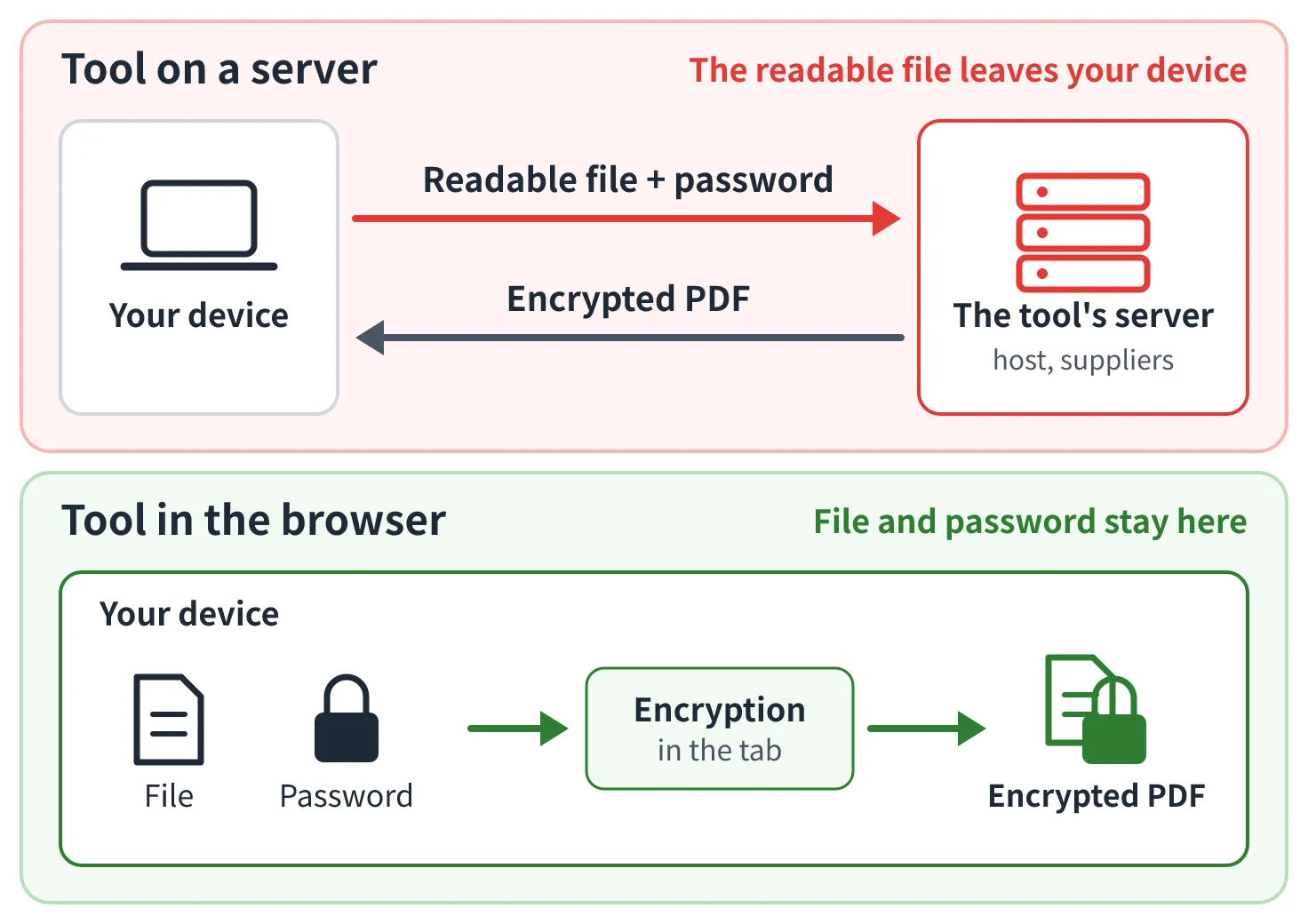
Some publishers draw the line themselves. Sejda contrasts its online tool with its desktop version, where "the files never leave your computer". Adobe's terms of use separate content stored locally, "never reviewed by us", from content placed in its cloud, which may be analyzed automatically to detect illegal or abusive content. That is the real dividing line: what stays on your device and what leaves it.
What has already happened to uploaded documents
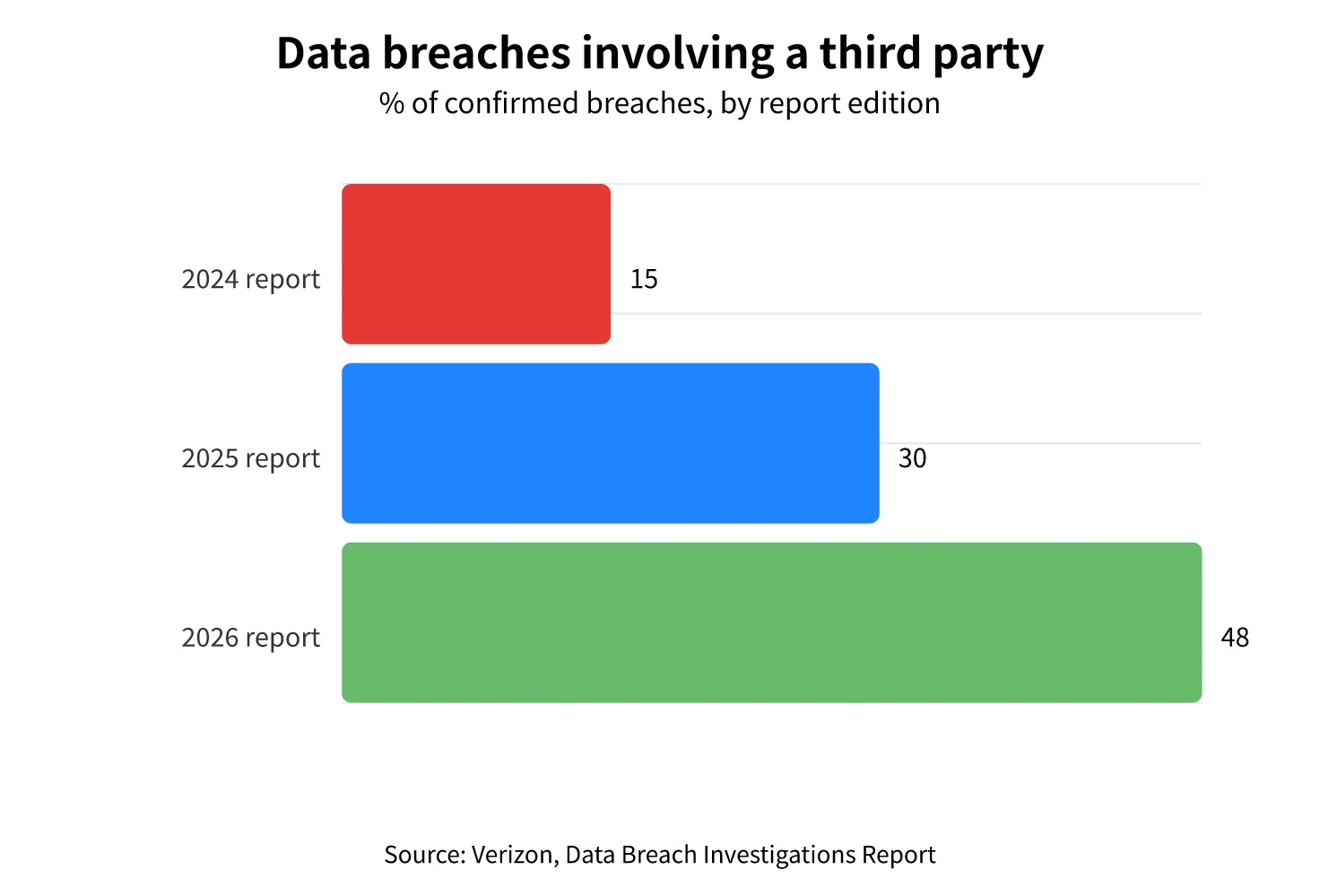
The risk of an upload depends on the security of a company you cannot audit. And third parties weigh more and more in data breaches: according to Verizon's annual report, a third party was involved in 15% of breaches in the 2024 edition, 30% in 2025 and 48% in 2026. The measure is broad: it covers all breaches and includes flaws in third-party software. It gives context and proves nothing about any specific service.
89,062 documents open to anyone
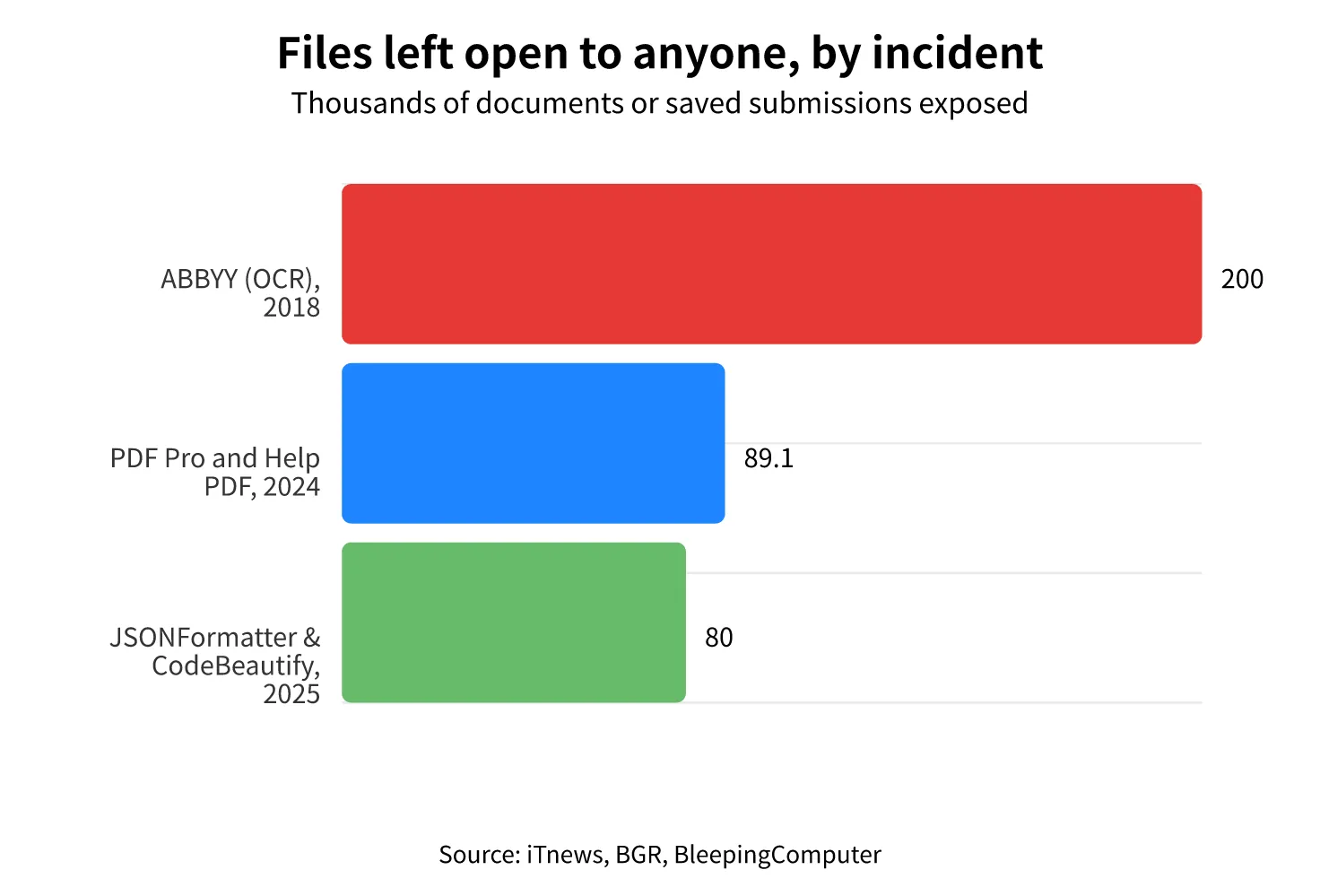
In July 2024, Cybernews revealed that two online converters, PDF Pro and Help PDF, left their users' files in Amazon S3 storage open to everyone. Its researchers counted 89,062 documents, including 87,818 at PDF Pro and 1,244 at Help PDF: passports, driver's licenses, certificates, contracts. At the time of publication, the publisher had not responded to the researchers.
Nobody had to hack anything. The storage was misconfigured, and users had no way to see it.
The same pattern elsewhere
This mistake keeps coming back, and it rarely looks like a sophisticated attack.
- ABBYY, 2018. An open database with no password at this OCR software publisher exposed about 200,000 scanned documents, including contracts and non-disclosure agreements, tied to one of its customers according to ABBYY.
- Box, 2019. Customers had made shared folders public, often without meaning to, at addresses that were easy to guess. Researchers found passport photos and financial documents there, across hundreds of customers in total.
- JSONFormatter and CodeBeautify, 2025. These tools format code, not PDFs, but the story is worth telling. More than 80,000 saved submissions were exposed, and fake access keys planted by researchers were used 48 hours after they were uploaded, which was 24 hours after the content was deleted. Deleting a file does not erase what someone already copied.
What the terms of use promise
One point first: we found no established document leak at the big online services. Their public pages, read on November 3, 2026, contain real commitments: most often deletion within one hour to 72 hours, sometimes encryption in transit and at rest or ISO/IEC 27001 certification.
Those commitments are serious, and nothing suggests they are not kept. But announced deletion remains a promise: none of the policies we read cites an audit of the deletion, and you cannot check it from your browser. It does not cover the time the file sits in storage either, which is exactly when PDF Pro exposed its files.
Adobe showed in 2024 how much these texts matter. Amended terms mentioned access to content through "automated and manual" methods, and an acceptance window blocked the apps. The company published a clarification on June 6, then new terms on June 18, and replied that it had never trained generative AI on its customers' content.
Hosted in Europe does not mean out of reach
A server in Europe does not tell you which law applies to the company running it, or to its suppliers. Smallpdf and Sejda, two European services, list Cloudflare or Google Cloud among their suppliers, for example. These American companies are subject to the CLOUD Act, a US law that can require them to hand over data they control, wherever it is stored.
Microsoft does not make these tools, but its example shows the problem well. On June 10, 2025, under oath before a French Senate inquiry, Microsoft France's director of public and legal affairs was asked for a guarantee that French citizens' data would never be handed over on a US order without the French authorities' consent. The answer, in our translation: "No, I cannot guarantee it, but, again, it has never happened so far."
The second half of that answer matters as much as the first. We found no documented case of authorities obtaining a file from an online PDF tool. It is a legal possibility, and you have no way of knowing which law applies to your file.
The question comes up outside Europe too. Article 7 of China's National Intelligence Law requires organizations to cooperate with intelligence services, although its practical reach is still debated. And LightPDF's terms place Wangxu Technology, the brand's owner, in Shenzhen.
If you handle client or employee data covered by the GDPR, the issue also becomes a regulatory one. On our reading of the GDPR, a service you send those documents to generally becomes your processor (Article 28), which calls for safeguards and a contract. That status is not theoretical: France's regulator, the CNIL, fined a processor €1.5 million in 2022, after a leak of health data revealed in 2021. Processing on your device avoids handing the content to a third party, which fits data minimization (Article 5) and data protection by design (Article 25). This reading is not a regulator's position, and it does not replace advice from your data protection officer.
Redacting online: sending the very thing you want to hide
Redaction takes the paradox furthest. You want to remove a name, an account number or a diagnosis, and a server-side tool receives exactly that information, in readable form, before taking it out.
Redacting means removing the data from the file, not only covering it. A black rectangle placed over text leaves the text in the document, where copy and paste is sometimes enough to recover it. It happened to the US Justice Department with the Epstein files in late 2025, and to Paul Manafort's lawyers in 2019. Those were mistakes of method, and online tools had nothing to do with them.
But even a perfect redaction does not settle the platform question. The copy you share no longer contains anything sensitive. The original contained everything, and that is the one that traveled to the server. If that server leaks, the flawless result no longer protects you.
In the browser, this problem does not exist: the original stays on your device for the whole operation, and only the final file leaves, if you decide to send it.

Redact a PDF
Mark what has to go: the content is removed from the file, in your browser.

What you can check for yourself
A promise of deletion has to be taken on trust. Local processing can be observed. With our tools, the file is opened, changed and saved in your browser tab: Password-protect PDF encrypts with 256-bit AES in the browser, without sending the document or the password, and Unlock PDF works the same way. Our privacy-by-design page describes the test that lets you see this for yourself.

Password-protect a PDF
Encrypt your PDF with 256-bit AES: the file and the password stay on your device.
Local processing does not solve everything, and this is the place to say so:
- Your device. If your computer is compromised, a local tool will not protect you. An encrypted file is only as good as its password.
- The page's code. Your browser runs the code we send it, and you are trusting us on that code. Our site is also hosted on Cloudflare, but your files do not go through it. That code runs in your browser: unlike on a server, it can be inspected.
- Our statistics. We record usage events: the tool used, the number and size of files, the options chosen. Never the document's content. Our privacy policy has the list.
- Three exceptions. Our Word, Excel and PowerPoint converters send the file to our server, which goes through Microsoft for the conversion, with encrypted transfer and automatic deletion after processing. On those three tools you are taking our word for it, as with any online service.
A simple rule for sensitive documents
A document you want to protect should not have to leave your device to get that protection. Before using an online tool for a contract, an ID or a payslip:
- ask whether the file goes to a server, and look for the answer in the service's pages rather than its slogan;
- be wary of converters you do not know, especially ones you reached through an ad;
- to encrypt or redact, prefer a tool that processes the file in your browser.
On Visual PDF, encryption, unlocking and redaction happen in your browser, no account needed. Drop a file and see for yourself.
Emmanuel Jégo
Founder @VisualPDF
Since 2020, I have been building tools to help you manipulate PDF files easily, while respecting your private data.