
Why our PDF tools show no cookie banner
On most sites, a banner asks you to accept cookies before you have read a single line. Here, that banner never appears, and its absence is not an oversight.
This article is also available in Français, Deutsch, Italiano, Español, and Português.

Emmanuel Jégo
September 1, 2026
The banner you never had to close
You know the drill. You open a site and, before you have read a single line, a window asks what you agree to share. Here, none of that happens: no banner asks you for anything.
There is no cookie banner on Visual PDF because there is nothing to consent to: no tracking cookies, no ad network, no profile of you.
This ritual has become so common that it has a name, consent fatigue. An IAB Europe study, reported by Euronews, finds that 54% of Europeans accept without stopping, against 26% who refuse. European authorities have launched a reform to simplify these requests, which amounts to admitting the system has failed.
What cookies actually do
Today, the word cookie mostly means the window that comes with it. The cookie itself is far more ordinary: a small text file that a site asks your browser to keep. At heart, it handles practical things, like remembering the language you chose.
What changes everything is what a cookie does next. The line that matters is not between cookies and no cookies, but between functional cookies and tracking cookies. A functional cookie remembers a choice: the display language, for example. A tracking cookie recognizes your browser from site to site and feeds an advertising profile. It is this second category that the GDPR requires your consent for. The first is exempt, precisely because it does not serve to follow you.
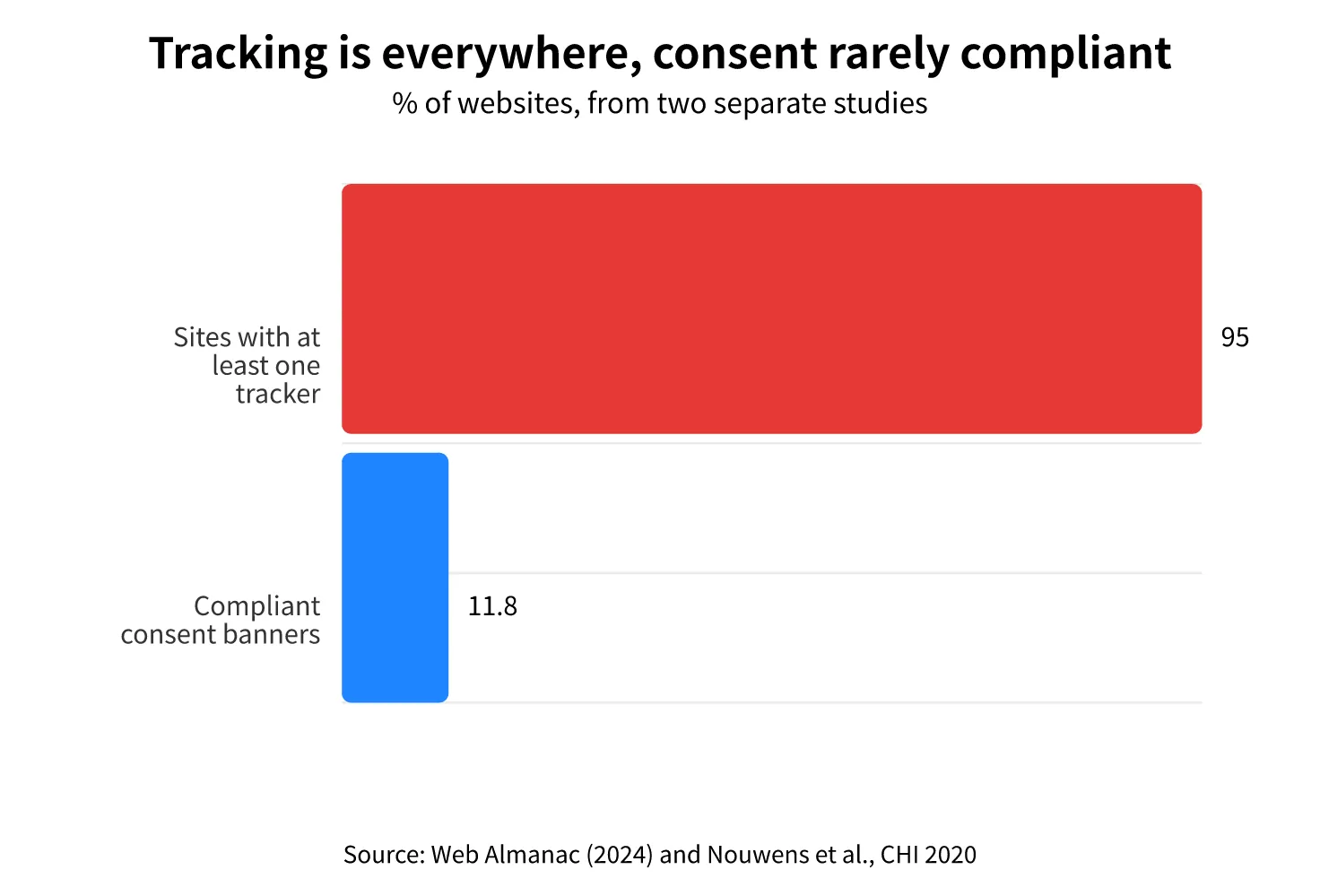
Tracking is far from marginal. According to the Web Almanac 2024, 95% of websites on desktop embed at least one tracker, and Google Analytics is present on 55% of pages. Another significant figure: a 2020 study published by the ACM on the 10,000 most visited sites in the United Kingdom concluded that only 11.8% of consent windows met the minimum GDPR requirements. Food for thought.
Why most free tools track you
A free tool always costs something to produce: servers, bandwidth and developers. Many free services close that gap with advertising and the resale of data. Targeted advertising needs trackers, and trackers need your consent. The cookie banner is therefore not a formality: it is the symptom of a business model that needs your agreement to function.
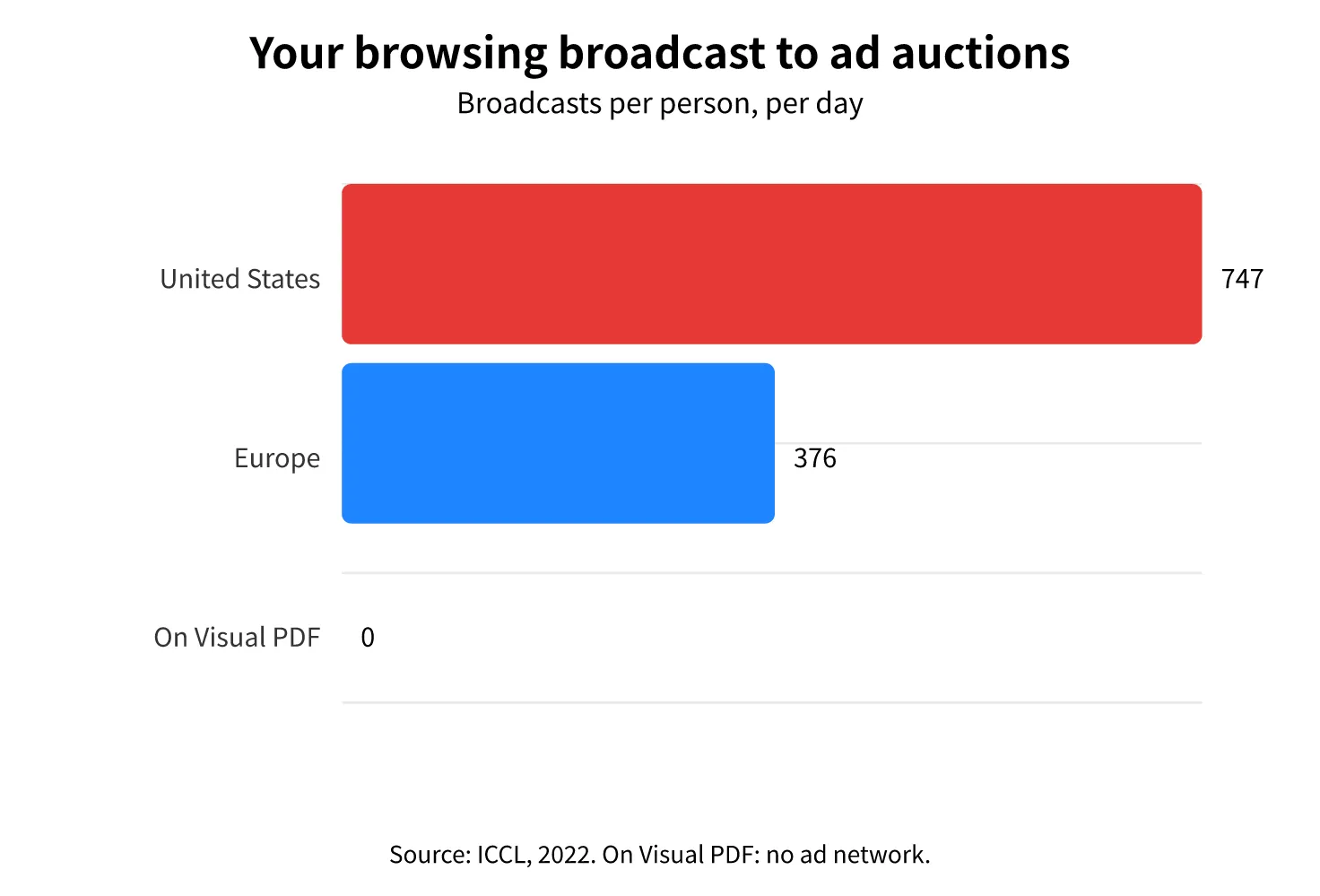
The scale of this market is hard to imagine. A 2022 ICCL report estimated that, in the United States, the activity and location of an average internet user were broadcast 747 times a day to real-time advertising auctions, and 376 times a day in Europe. Every time you open a site that uses tracking cookies, your browsing can feed this machine, often without your knowing it.
European authorities have stopped pretending. In 2025, the French data protection authority fined Google 325 million euros for slipping ads into Gmail without consent and for making it harder to refuse cookies than to accept them. Three years earlier, in 2022, the same group and Facebook had been fined 150 and 60 million euros for the same reason, as CNBC reported: refusing cookies should be as easy as accepting them, and it was not.
The only cookie we set
On Visual PDF, the situation is simpler, and it fits in one sentence: we set exactly one cookie, "i18n_redirected", which remembers your language preference. It contains no identifier and does one thing only: send you back to the right version of the site on your next visit. It is a strictly functional cookie, exempt from consent.
Alongside it, a few settings remain in your browser, like your zoom level in the editor. They never leave your device. There is no advertising cookie and no third-party tracking cookie, and that is exactly why no banner appears.
We still measure how the site is used, because we need to know which tools work and which ones break. This audience measurement is cookieless and runs on our own servers: no ad network is involved, no profile is built, and we get only traffic figures from it. Your IP address is used only to infer your country and region, then discarded: it is not kept alongside your visits.
European rules require consent for tracking, not for functional cookies or for audience measurement that does not follow people. The legal detail lives in our privacy policy.
No tracking is a consequence, not a promise
If we set no tracking cookies, it is not (only) to look good. It is the direct consequence of how the tools are built: almost everything runs in your browser, not on our servers.
When you use a client-side tool, your files never leave your device: we can neither see them, store them, nor analyze them. There is nothing to track. We did not give up tracking out of kindness; we chose an architecture that does not need it.
And that is where it matters, because a PDF is rarely a trivial document. It is a contract, a payslip, a piece of ID, a medical file. Sending that kind of file to someone else's server means trusting them with far more than a document: it means trusting them with a part of your life. A file that never leaves, by contrast, cannot leak.
The risks are not theoretical. In 2025, the FBI issued a warning about free online file converters, noting that some were used to spread malware and to collect the documents people sent, down to social security numbers, passwords and banking data. BleepingComputer then confirmed the existence of fake converters that really did push malware. And even among legitimate tools, servers get hacked: the account data of millions of users of an online PDF editor was exposed in 2019, as BankInfoSecurity reported.
One exception remains, which we detail in the FAQ below: the Word, Excel and PowerPoint conversions, which need a server. For everything else, the principle is the same, whether you run the PDF merger or go through Compress a PDF. You can go deeper in our page on privacy at Visual PDF.
Check it yourself, do not take our word for it
We could write entire pages about our good faith. You have no reason to believe us, and the good news is that you do not have to.
Granted, it takes a little effort for the least technical among you, but nothing insurmountable.
Open your browser's developer tools, go to the Network tab, then run a tool like the PDF merger. You will see the page load, then nothing more: your document never appears in the list of requests. No file data is sent. This is a test most PDF sites cannot pass, because they must receive your file before they can process it.
Merge your PDFs safely
Drop your files and combine them in seconds. Your documents are never sent to a server.

Frequently asked questions
Visual PDF was born from a simple bet: you can offer free PDF tools without paying for them with data. Servers cost money, and we pay for them another way, with no advertising and no profile to sell. Our priorities are and will remain building the best PDF tools and respecting your private data.
Emmanuel Jégo
Founder @VisualPDF
Since 2020, I have been building tools to help you manipulate PDF files easily, while respecting your private data.